Advanced Circle Area & Perimeter Calculator
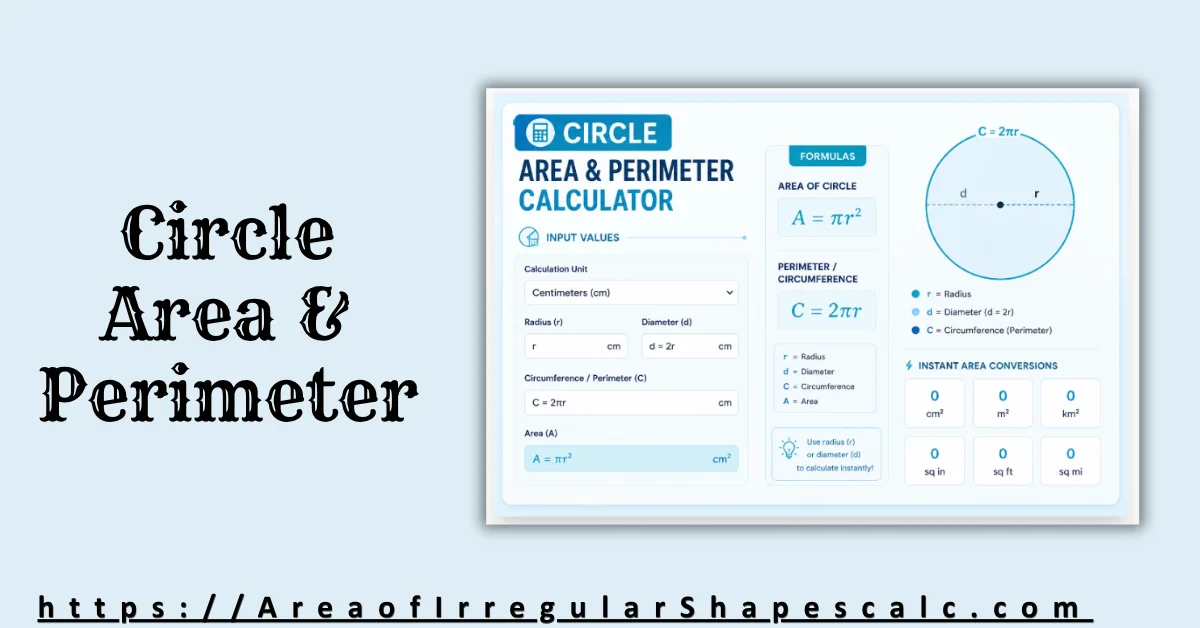
Type any ONE known value to instantly calculate the other three. Our dynamic engine handles the formulas and unit conversions automatically.
Instant Area Conversions
Circle Geometry & Formulas
A circle is a closed, two-dimensional curved shape where all points on the boundary are equidistant from a single center point. This distance is called the radius.
Key Formulas
- Diameter (d) = 2 × Radius = 2r
- Circumference (C) = 2 × π × Radius = πd
- Area (A) = π × Radius² = πr²
- Radius (r) = C / 2π = √(A/π)
Definitions
- Radius (r): The distance from the center to any point on the boundary.
- Diameter (d): A straight line passing through the center, touching two points on the boundary. It is the longest chord.
- Circumference (C): The total distance around the outside of the circle.
- Pi (π): A mathematical constant (~3.14159) representing the ratio of a circle's circumference to its diameter.
A circle is one of the most important geometric shapes because it appears naturally in engineering, construction, transportation, architecture, manufacturing, and everyday objects. Unlike polygons that contain straight edges and corners, a circle forms a perfectly curved boundary where every point remains the same distance from the center.
This constant distance from the center to the edge is called the radius. The radius controls nearly every major property of the circle, including diameter, circumference, and area. Because these measurements are mathematically connected, knowing just one value allows the remaining properties to be calculated automatically.
The perimeter of a circle is known as the circumference. It measures the total curved distance around the outer boundary. The area, meanwhile, represents the amount of space enclosed inside the circle.
Although these concepts appear simple initially, circle calculations become repetitive when multiple formulas, reverse calculations, and unit conversions are involved. A Circle Area & Perimeter Calculator simplifies this process by automatically solving interconnected circle measurements from a single known value.
What the Circle Area & Perimeter Calculator Solves
A Circle Area & Perimeter Calculator is designed to solve all major circle properties automatically. Instead of manually rearranging formulas and calculating each measurement separately, the calculator derives every connected value instantly from one known input.
Depending on the available information, the calculator can solve using:
-
radius,
-
diameter,
-
circumference,
-
area.
Once a value is entered, the calculator automatically computes all remaining circle properties. This creates a much faster and more reliable workflow compared to manual calculations.
For example, if the radius is known, the calculator can immediately determine the diameter, circumference, and total area. Similarly, if only the area is available, the calculator can reverse the formulas to determine the circle’s radius and perimeter automatically.
This interconnected solving system becomes extremely useful in real-world applications where measurements are often incomplete. Engineers, contractors, architects, landscapers, and manufacturing professionals frequently need to calculate missing circular dimensions quickly and accurately.
Circle Formulas Used in the Calculator
Circle geometry relies on a small group of highly connected formulas. Understanding these relationships helps explain how the calculator derives all measurements automatically.
Diameter Formula
The diameter measures the full distance across the circle through its center.
The formula is:
\(d = 2r\)
Where:
-
\(d\)= diameter -
\(r\)= radius
This means the diameter is always twice the radius.
For example, if the radius measures 8 centimeters:
\(d = 2(8)\)
\(d = 16 \text{ cm}\)
This relationship forms the foundation for many other circle calculations.
Circumference Formula
Circumference represents the total curved distance around the circle.
The most common formula is:
\(C = 2\pi r\)
Another equivalent form is:
\(C = \pi d\)
Where:
-
\(C\)= circumference -
\(\pi\)≈ 3.14159
For example, if the radius equals 5 meters:
\(C = 2\pi(5)\)
\(C \approx 31.42 \text{ m}\)
This formula is widely used in wheel systems, pipe measurements, circular foundations, and rotating machinery because perimeter distance directly affects movement and sizing.
Area Formula
The area formula calculates the amount of space enclosed inside the circle.
The formula is:
\(A = \pi r^2\)
Where:
-
\(A\)= area
For example, if the radius equals 6 inches:
\(A = \pi(6^2)\)
\(A = \pi(36)\)
\(A \approx 113.10 \text{ in}^2\)
Unlike circumference, which increases linearly, area increases quadratically because the radius becomes squared. This means even small increases in radius create much larger increases in total area.
Radius Formula From Area
The calculator can also reverse the area formula to determine radius from a known area.
The formula becomes:
\(r = \sqrt{\frac{A}{\pi}}\)
This reverse-solving capability becomes extremely useful in construction, landscaping, manufacturing, and engineering systems where the total circular coverage area may already be known.
How Circle Measurements Are Connected
One of the most important concepts in circle geometry is that all measurements remain mathematically connected. Changing one property automatically affects all others.
When the radius increases, both circumference and area increase as well. However, they do not increase at the same rate.
Circumference grows proportionally with the radius because the relationship remains linear. If the radius doubles, the circumference also doubles.
Area behaves differently because the radius is squared in the formula. When the radius doubles, the area becomes four times larger rather than merely doubling.
For example, consider a circle with radius 4:
\(A = \pi(4^2)\)
\(A = 16\pi\)
If the radius doubles to 8:
\(A = \pi(8^2)\)
\(A = 64\pi\)
The area becomes four times larger.
Understanding this proportional relationship is important in practical applications such as material estimation, land measurement, engineering design, and manufacturing systems because area growth accelerates rapidly as circle size increases.
How to Use the Circle Area & Perimeter Calculator
The calculator is designed to simplify circle geometry while reducing repetitive manual calculations.
To begin, enter any known circle measurement. Depending on the calculator setup, this may include radius, diameter, circumference, or total area.
Once the input is entered, the calculator automatically derives all remaining circle properties instantly. This includes reverse-solving calculations when necessary.
Many advanced calculators also provide automatic area conversions between square units such as square centimeters, square meters, square feet, and square inches.
This becomes especially useful in engineering and construction environments where projects often require switching between multiple unit systems.
Instead of manually rearranging formulas or repeating calculations, the calculator solves everything from a single interface.
Real-World Applications of Circle Area & Perimeter Calculations
Circle geometry appears constantly in practical environments because circular structures and rotating systems are extremely common in both natural and engineered designs.
In construction, contractors calculate circular foundations, columns, tanks, pipes, and curved pathways using area and perimeter formulas. Accurate circle calculations help estimate materials, dimensions, and structural spacing.
Landscapers frequently calculate circular garden layouts, patios, fountains, and planting areas where precise area measurements are needed for planning and material estimation.
Mechanical engineers rely heavily on circumference calculations when designing wheels, gears, pulleys, turbines, and rotating machinery because rotational movement depends directly on circular perimeter distance.
Manufacturing industries also use circle geometry in cylindrical containers, industrial rollers, circular molds, and pipe systems where both area and perimeter measurements affect production specifications.
Transportation systems depend on circular calculations in tire sizing, wheel rotation analysis, track design, and curved roadway engineering.
Even everyday objects such as clocks, tables, lids, cables, plates, and sports equipment involve circle geometry during design and production.
Because circles distribute force evenly and allow smooth rotational movement, they remain one of the most important shapes in practical engineering and industrial systems.
Common Mistakes When Calculating Circle Area and Perimeter
Although circle formulas are relatively simple mathematically, several common mistakes still occur frequently.
One major issue involves confusing radius and diameter. Since the diameter is twice the radius, entering the wrong value can significantly distort the final calculation.
Another common problem occurs when users confuse area and circumference. Circumference measures linear distance around the circle, while area measures enclosed surface space. These quantities use different formulas and different unit systems.
Circumference uses regular length units such as:
\(\text{cm}\),\(\text{m}\),
or\(\text{ft}\).
Area, meanwhile, uses square units such as:
\(\text{cm}^2\),\(\text{m}^2\),
or\(\text{ft}^2\).
Premature rounding can also reduce precision, especially in engineering or manufacturing calculations where tolerances matter.
Some users may also apply incorrect approximations for \(\pi\). Reliable calculators maintain full decimal precision during calculations before rounding the final answer.
Circle Calculator vs Manual Calculation
Manual circle calculations may appear manageable for simple geometry problems, but they quickly become repetitive when multiple interconnected measurements must be solved together.
A Circle Area & Perimeter Calculator simplifies the process by automatically handling formulas, conversions, and reverse-solving operations instantly.
This improves both speed and reliability while reducing human error.
Instead of repeatedly rearranging equations or checking calculations manually, users can solve the entire circle from a single known value.
For students, this improves learning and verification. For professionals, it improves workflow efficiency and measurement accuracy.
FAQs
What is the difference between circle area and perimeter?
Area measures the space inside the circle, while perimeter, also called circumference, measures the distance around the outer edge.
How do you calculate circle area?
The formula is:
\(A = \pi r^2\)
where \(r\) is the radius.
How do you calculate circumference?
The formula is:
\(C = 2\pi r\)
or
\(C = \pi d\)
Why is pi used in circle formulas?
\(\pi\) represents the constant ratio between a circle’s circumference and its diameter.
Can you calculate radius from area?
Yes. Radius can be calculated using:
\(r = \sqrt{\frac{A}{\pi}}\)
What happens when the radius doubles?
When the radius doubles, the circumference doubles, but the area becomes four times larger.
What units are used for circle area?
Circle area uses square units such as:
\(\text{cm}^2\),\(\text{m}^2\),\(\text{ft}^2\),
and\(\text{in}^2\).
Final Thoughts
A Circle Area & Perimeter Calculator simplifies one of geometry’s most important measurement systems by automatically solving interconnected circle properties from a single known value. Whether the available measurement is radius, diameter, circumference, or area, the calculator can instantly derive all remaining dimensions while handling reverse calculations and unit conversions automatically.
These calculations play a major role in construction, engineering, manufacturing, transportation, landscaping, and industrial design because circular structures and rotating systems appear in countless real-world applications. Manual calculations can quickly become repetitive when multiple formulas and conversions must be handled together, especially in precision-focused environments.
By combining area formulas, perimeter calculations, reverse-solving methods, and automatic conversions into a single tool, the calculator improves both efficiency and accuracy while making circle geometry much easier to understand and apply.