
Irregular Pentagon Area Calculator
Calculate the area, perimeter, and interior angles of any five-sided shape — using side lengths and diagonals, exact coordinates, by drawing the shape on a grid, or by entering one measurement of a regular pentagon. Works for any irregular pentagon, a true regular pentagon, or a general 5-sided plot, room, or roof section.
Sides
Diagonals
Number the corners 1 to 5 in order as you go around the shape. d1 connects corner 1 to corner 3; d2 connects corner 1 to corner 4.
Pentagons look simple on paper. Five sides, five corners. But in real life, pentagons rarely behave the way textbooks describe them.
Walls are angled. Boundaries bend. Roofs intersect at odd points. Measurements are taken on site, not drawn perfectly on a grid. In these situations, regular pentagon formulas simply do not work.
That is exactly why this Irregular Pentagon Area Calculator exists.
Instead of assuming equal sides or neat angles, it works with the measurements you actually have. You enter what you can measure, or what you already know, and the calculator finds the area without forcing the shape to behave like something it is not.
Alongside the area, the calculator also works out the perimeter and the interior angle at every corner. If you do not have any measurements yet, you can skip the numbers entirely and draw the pentagon, or any other five-sided shape, directly on a grid.
What Is an Irregular Pentagon?
A pentagon is any shape with five sides.
It becomes irregular when:
- The sides are not the same length
- The angles are different
- The shape has no symmetry
In practice, this describes most five-sided spaces found in land plots, building layouts, roofs, and outdoor designs. Once the shape becomes irregular, there is no single shortcut formula that can be trusted.
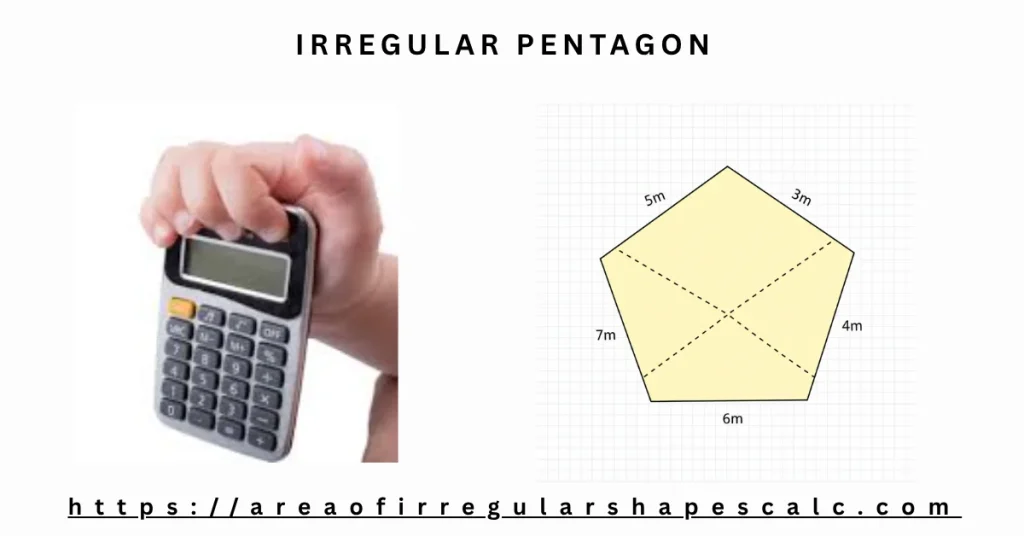
Why Irregular Pentagons Are Hard to Measure
Many people search for a simple formula and quickly realize there isn’t one.
The problem is not math. The problem is data.
- Angles are rarely measured outside of drawings
- Field measurements are usually straight-line distances
- The shape may lean or stretch in ways that are hard to describe
To calculate area correctly, the pentagon must either be broken into simpler shapes or described using coordinates. This calculator supports both approaches, so you can choose what fits your situation.
Irregular Pentagon Area Formula
There is no single formula for the area of an irregular pentagon the way there is for a rectangle or a circle, because an irregular pentagon can take almost any shape. Instead, the area is worked out by breaking the pentagon into simpler pieces, using whichever measurements are available.
Formula: Splitting the Pentagon Into Triangles
If you know the five side lengths and two diagonals, the pentagon can be split into three triangles from one corner, and each triangle’s area found with Heron’s formula.
Area = Triangle(a, b, d1) + Triangle(d1, c, d2) + Triangle(d2, d, e)
Where:
- a, b, c, d, e = the five side lengths, in order around the shape
- d1 = the diagonal from corner 1 to corner 3
- d2 = the diagonal from corner 1 to corner 4
- Triangle(x, y, z) = the area of a triangle with side lengths x, y, and z, using Heron’s formula: s = (x + y + z) / 2, then Triangle area = the square root of s × (s − x) × (s − y) × (s − z)
Suppose all five sides are 4 m and both diagonals are 6.5 m:
- Triangle(4, 4, 6.5) ≈ 7.58 m²
- Triangle(6.5, 4, 6.5) ≈ 12.37 m²
- Triangle(6.5, 4, 4) ≈ 7.58 m²
Area ≈ 7.58 + 12.37 + 7.58 = 27.53 m². The perimeter is simply the five sides added together: 4 + 4 + 4 + 4 + 4 = 20 m.
Formula: Coordinates (Shoelace Formula)
If you know the exact X and Y coordinates of each corner, the shoelace formula gives the area directly:
Area = ½ × the absolute value of: (x1×y2 − x2×y1) + (x2×y3 − x3×y2) + (x3×y4 − x4×y3) + (x4×y5 − x5×y4) + (x5×y1 − x1×y5)
Where x and y are the coordinates of each corner, numbered in order around the shape.
For corners at (0, 0), (4, 0), (5, 3), (2, 5), and (−1, 3), the five terms add up to 42, so the area is ½ × |42| = 21 m².
This calculator applies both formulas automatically, along with the perimeter and the interior angle at every corner, so you never need to do the arithmetic by hand.
Formula: Regular Pentagon (Equal Sides)
A regular pentagon has five equal sides and five equal interior angles, each 108°. Because every side and angle is identical, a single measurement is enough to solve for the side length, apothem, circumradius, perimeter, and area. The formulas below use n = 5.
By Side Length
Area = (5 × side²) ÷ (4 × tan 36°)
For a side of 5 m: Area = (5 × 25) ÷ (4 × 0.7265) ≈ 43.01 m². Perimeter = 5 × 5 = 25 m.
By Apothem
Side = 2 × apothem × tan 36°, then Area = 5 × apothem² × tan 36°.
For an apothem of 3.4 m: side ≈ 2 × 3.4 × 0.7265 ≈ 4.94 m, and area ≈ 5 × 3.4² × 0.7265 ≈ 41.99 m².
By Circumradius
Side = 2 × circumradius × sin 36°, then Area = (5 × circumradius² × sin 72°) ÷ 2.
For a circumradius of 6 m: side ≈ 2 × 6 × 0.5878 ≈ 7.05 m, and area ≈ (5 × 36 × 0.9511) ÷ 2 ≈ 85.60 m².
By Perimeter
Side = perimeter ÷ 5. Once the side is known, the area follows from the side-length formula above.
By Area (Reverse Solve)
Side = the square root of (4 × area × tan 36°) ÷ 5. This is useful when you know how much space a regular pentagon should cover and need to work out the side length to build or cut it.
Every interior angle of a regular pentagon is 108°, and every exterior angle is 72° — the two always add up to 180° at each corner, and the five exterior angles always sum to 360°.
Four Practical Ways to Calculate the Area
This calculator offers four practical methods. Two are based on the formulas above, for when you have real-world measurements or precise coordinates. The third lets you draw the shape directly, with no measuring required, and the fourth solves a true regular pentagon — one where every side and angle is equal — from a single measurement.
Method One: Using Side Lengths and Diagonals
This is the recommended method for most real situations.
Instead of guessing angles, the pentagon is split internally into triangles using diagonals. Triangles are stable shapes. Their area can be calculated accurately using lengths alone.
You will need:
- All five side lengths
- Two diagonals connecting non-adjacent corners
This method works well when:
- You are measuring a physical space
- Angles are unknown or hard to capture
- You are working with land, rooms, roofs, or layouts
That is why this option is marked as the preferred method in the calculator.
Method Two: Using Coordinates (Shoelace Method)
When you already have exact coordinates, the calculator can use them directly.
You provide:
- X and Y coordinates for each of the five corners
The calculator then applies a proven coordinate-based method to calculate the area accurately.
This approach is ideal for:
- Survey data
- CAD or GIS exports
- Technical or academic work
Method Three: Drawing the Shape
If you do not have side lengths, diagonals, or coordinates yet, you can draw the pentagon directly. Set a real-world grid scale, for example one grid square equals one meter, then click to place each corner. Snap-to-grid and snap-to-90-degree options help keep the shape accurate as you draw, and you can type an exact length for any edge afterward if you know it.
This approach is ideal for:
- A quick estimate before you have taken any measurements
- Sketching a plot, room, or roof section from memory or a rough site visit
- Checking that a shape drawn from other measurements looks right
Method Four: Regular Pentagon (Equal Sides)
If the pentagon you are working with is regular — all five sides and angles equal — you do not need diagonals, coordinates, or a drawing. Select “Regular Pentagon” and enter whichever single measurement you already know: side length, apothem, circumradius, perimeter, or area. The calculator solves for all the others automatically, along with the interior and exterior angles.
This approach is ideal for:
- Regular pentagon tiles, pavers, or decorative panels
- Pentagon-shaped signage, plaques, or logos with equal sides
- Geometry problems that specify a regular pentagon directly
How to Use the Irregular Pentagon Area Calculator
Using the calculator is straightforward.
- Choose the calculation method that matches your data: sides and diagonals, coordinates, or drawing the shape
- Select your measurement unit
- Enter the required values, or draw the shape on the grid
- Click calculate
The calculator applies the correct math internally and shows the area, perimeter, and every interior angle clearly, along with a drawing of the shape you entered.
Where This Calculator Is Commonly Used
Land and Plot Measurement
Five-sided plots appear where roads, boundaries, or natural features meet. Approximating these as rectangles or trapezoids often leads to noticeable errors. Using real side and diagonal measurements gives a far more reliable result.
Architecture and Building Layouts
Angled extensions, bay areas, and non-square connections often create pentagonal spaces. This calculator helps estimate usable floor area without forcing right angles that do not exist.
Roofing and Structural Sections
Roof surfaces frequently form irregular pentagons due to slopes and intersections. Accurate area calculations are essential for material estimates and cost planning.
Landscaping and Outdoor Design
Patios, garden sections, and fencing layouts often follow five-sided boundaries. Knowing the exact area helps with planning turf, stone, irrigation, and spacing.
Learning and Applied Geometry
Irregular pentagons are a good example of how real shapes are solved using decomposition or coordinates, not memorized formulas.
Common Mistakes This Calculator Helps Avoid
Many errors come from habit rather than bad measurements.
This calculator helps prevent:
- Using regular pentagon formulas for irregular shapes
- Measuring the wrong diagonals
- Mixing units accidentally
- Assuming angles are close enough to ignore
By matching the calculation method to the data you actually have, the results stay reliable.
Frequently Asked Questions
Yes. The side and diagonal method does not require angles.
You have three options: measure or estimate at least one diagonal, use exact coordinates for each corner, or simply draw the pentagon on the grid, which needs neither diagonals nor coordinates.
Yes, when the coordinates are correct.
Yes. The calculator is designed for real units and practical measurements.
Yes. Once you calculate the area using any of the three methods, the calculator also shows the interior angle at every corner and the total perimeter.
There are two formulas, depending on your data: splitting the pentagon into three triangles using the side lengths and two diagonals with Heron’s formula, or using the shoelace formula if you know the coordinates of each corner. Both are explained in detail above, with worked examples.
Area = (5 × side²) ÷ (4 × tan 36°), which works out to about 1.72 × side². The calculator can also solve it from the apothem, circumradius, perimeter, or area itself using the Regular Pentagon method above.
Final Thoughts
Irregular pentagons represent real space, not ideal geometry. This calculator adapts to how measurements are actually taken, whether that means using side lengths on site or coordinates from a plan.
Choose the method that fits your data, enter what you know, and let the calculator handle the rest with clarity and confidence.