Square Footage Calculator for Irregular Shapes
Most real rooms aren’t one clean rectangle. Break yours into sections — a rectangle for the main room, a triangle for the bay window nook, another rectangle for the closet — and this adds them all up for you. Prefer exact corner coordinates instead? There’s an advanced mode for that too.
| Section | Shape | Dim 1 (ft) | Dim 2 (ft) | Sq Ft |
|---|
You’re standing in a room with a tape measure, trying to figure out how much flooring to order, and the room is not cooperating. There’s a bump-out by the window. One wall juts in for a closet. It’s basically rectangular, except for the part that isn’t. Length × width worked fine in the last room. This one, it doesn’t.
That’s the actual problem this page is for — not the geometry-class version, the one where you’re holding a tape measure and a coffee, trying to get a number you can trust before you call the flooring guy.
The trick isn’t a formula — it’s how you split the room
Here’s the thing nobody tells you up front: there’s no magic formula for an irregular room. What actually works, and what every flooring installer and contractor does, is split the space into pieces you already know how to measure — rectangles and triangles — then add them up.
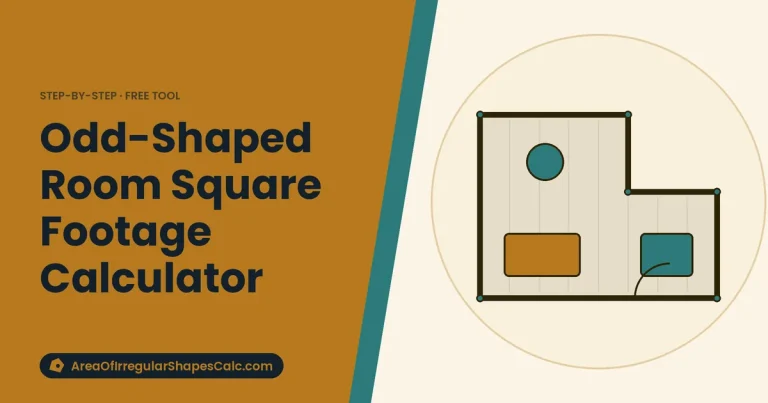
An L-shaped room becomes two rectangles. A room with a bay window becomes a rectangle plus a triangle (or a smaller rectangle) for the nook. A pentagon-ish sunroom becomes a rectangle with a triangular end. Once you see it this way, almost anything breaks into shapes you can measure with a tape measure and a bit of patience.
The calculator above does exactly this: add one section per rectangle or triangle in your room, punch in the two measurements for each, and it keeps a running total — in square feet, square meters, and acres — as you go.
Walking through an actual L-shaped room
Say you’ve got a living room that’s roughly L-shaped: a main section 12 ft by 8 ft, with a dining nook sticking out that’s 6 ft by 6 ft.
Main section: 12 × 8 = 96 sq ft
Dining nook: 6 × 6 = 36 sq ft
Total: 132 sq ft
Add both as rectangle sections in the calculator and it’ll land on the same 132 sq ft instantly — the point isn’t that the math is hard, it’s that doing it by hand for four or five sections gets tedious and easy to fat-finger. The calculator just keeps the running total straight.
The stuff that actually trips people up
Bay windows and alcoves. These either add floor area (a bay window nook you’re carpeting) or don’t count at all (a window seat you’re not flooring). Decide which applies before you measure, or you’ll be off by a section’s worth of square footage.
Multiplying the whole bounding box. It’s tempting to just measure the room’s overall length and width like it’s a rectangle and multiply. For an L-shaped room, that overstates the area — you’d be including the corner that isn’t actually there. Split it into the real sections instead.
DIY measurement error. Even careful hand measurements typically run 3–7% off from a professional survey — walls aren’t perfectly straight, tape measures drift, corners aren’t quite square. For ordering flooring or tile, add a 5% waste factor on top of your calculated total to cover both the measurement slack and the material you’ll lose to cuts.
Whole house, not just one room
If you’re estimating an entire floor — living room, hallway, closets, all of it — you don’t need to reset between rooms. Just keep adding sections: each room, and each irregular piece of each room, is its own rectangle or triangle in the same running list. The total at the bottom is your whole-house square footage.
When you actually have exact coordinates
If you’re working from a site plan, a survey, or you’ve traced a lot boundary in a mapping tool, you probably already have corner coordinates rather than tape-measure lengths. The Advanced tab handles that case directly — enter each corner in order and it calculates the exact enclosed area using the shoelace formula, the same method surveyors use for irregular land parcels. Google Earth Pro’s polygon tool is a decent free way to generate rough coordinates for a yard or lot if you don’t have a formal survey.
Where this comes up
Flooring and carpet — ordering the wrong square footage means either a mid-install trip back to the store or a stack of expensive leftover material.
Paint — coverage is sold per square foot, so an oddly-shaped room needs an accurate total to know how many cans to buy.
Real estate listings — rooms with bump-outs or additions need to be measured properly, not eyeballed, if the square footage is going in a listing.
Lawns and landscaping — sod, mulch, and fertilizer are priced by square footage, and a yard that wraps around a house rarely fits a single length × width guess.
Frequently Asked Questions
Can I just multiply the room’s overall length and width?
Only if the room is a true rectangle. For an L-shape or any room with a cut-out, multiplying the bounding length and width overstates the area — split it into sections instead.
How accurate are DIY measurements really?
Typically within 3–7% of a professional survey. That’s fine for ordering flooring or paint (add a 5% waste factor to be safe). For a real estate listing or a permit application, it’s worth hiring a measuring specialist.
What about a curved edge, like a rounded patio corner?
Approximate the curve with a triangle or a couple of small rectangles that roughly follow the curve. It won’t be perfect, but it’ll be close enough for material estimates — curves rarely account for much of the total area anyway.
Do I need coordinates, or can I just use tape-measure lengths?
For almost everyone, tape-measure lengths and the section method above are all you need. Coordinates are for when you already have them — a survey, a site plan, or GPS points — not something you need to go generate specially.
Bottom line
Irregular doesn’t mean complicated — it just means more than one rectangle. Break it up, measure each piece, and let the running total do the adding.