
Irregular Quadrilateral Area Calculator
Calculate the area, perimeter, and every interior angle of an irregular quadrilateral using either the Sides & Diagonal method (four side lengths plus one diagonal — no angles needed) or the Coordinates (Shoelace) method (exact corner coordinates). Results are shown in square meters, square feet, and acres.
Label the corners V1 → V2 → V3 → V4 in order around the shape, then measure the four sides and the diagonal from V1 to V3.
Many shapes in real life have four sides, but very few of them behave like a perfect rectangle.
A room might have one wall slightly angled. A plot boundary may look almost rectangular, but not quite. A construction layout could shift on site, breaking right angles without anyone noticing. On paper, these shapes still look “close enough” to rectangles — but mathematically, they are not.
This is where people usually make mistakes.
They use length × width out of habit, assume angles are roughly 90°, and move on. The result looks reasonable, but it is often wrong.
An Irregular Quadrilateral Area Calculator exists for exactly this situation. It does not assume right angles or parallel sides. It works with the shape as it actually is — and alongside the area, it also returns the perimeter, every interior angle, and the equivalent area in acres for land and plot work.
What Is an Irregular Quadrilateral?
A quadrilateral is any shape with four sides.
It becomes irregular when:
- The sides are different lengths
- The angles are not right angles
- Opposite sides are not parallel
Once any of these happen, rectangle formulas no longer apply.
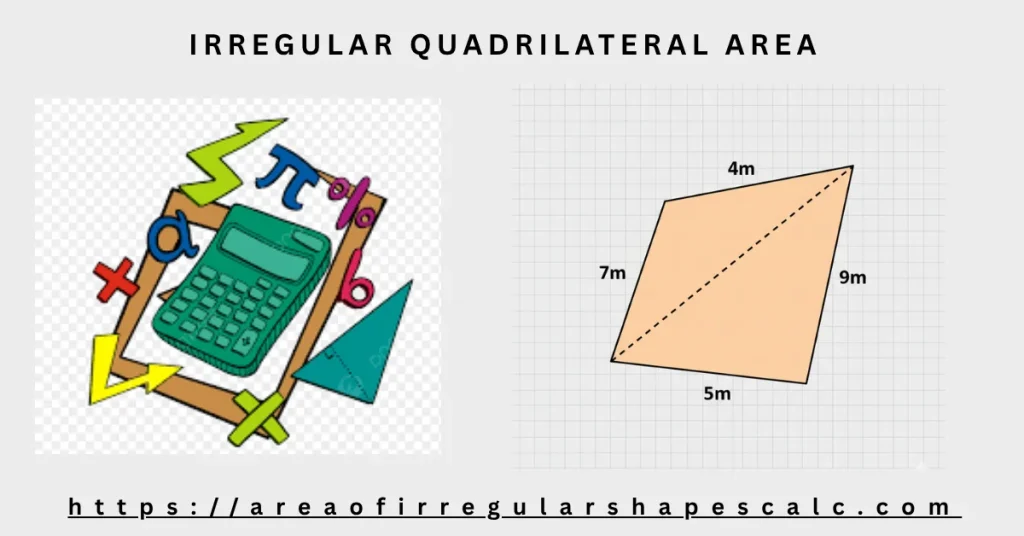
People often call these shapes “irregular rectangles,” and if your shape looks roughly rectangular but isn’t quite square-cornered, the irregular rectangle area calculator covers that specific case. If it doesn’t resemble a rectangle at all — more of a kite, trapezoid, or general four-sided shape — the calculator below is the better fit.
Why Rectangle Formulas Fail in Real Life
Rectangle formulas work only because rectangles are predictable:
- All angles are 90°
- Opposite sides are equal
- Height is clearly defined
In an irregular quadrilateral, none of this is guaranteed.
There may be no clear height. Angles can lean inward or outward. Two sides that look parallel may not be.
When you try to force a rectangle formula onto this kind of shape, small errors quietly creep in. Those errors grow when the shape gets larger.
The safer approach is to stop thinking in rectangles altogether.
The Practical Solution: Split the Shape Into Two Triangles
Triangles are stable shapes. Their area can be calculated accurately using side lengths alone.
That is why the most reliable way to calculate the area of an irregular quadrilateral is to:
- Draw a diagonal between two opposite corners
- Split the shape into two triangles
- Calculate the area of each triangle
- Add the two areas together
This method does not rely on angles being perfect or sides being parallel. It only depends on measurements you can actually take.
How the Diagonal Method Works (In Plain Language)
To use this method, you need:
- Four side lengths of the quadrilateral
- One diagonal length connecting opposite corners
That diagonal becomes a shared side.
- Triangle one uses two sides of the quadrilateral plus the diagonal
- Triangle two uses the remaining two sides plus the same diagonal
Each triangle’s area is calculated internally using a proven geometric method. You never have to do this math yourself. The calculator handles it cleanly and safely.
Irregular Quadrilateral Area Formula
The calculator above uses one of two formulas, depending on which measurements you have.
Method One: Sides and One Diagonal (Heron’s Formula)
Label the four corners V1, V2, V3, and V4 in order around the shape. Measure the four sides — a (V1 to V2), b (V2 to V3), c (V3 to V4), d (V4 to V1) — and one diagonal, p (V1 to V3). The diagonal splits the quadrilateral into two triangles, and each triangle’s area is found with Heron’s formula:
Area = √(s × (s − x) × (s − y) × (s − z))
Where:
- x, y, z = the three side lengths of one triangle
- s = the semi-perimeter of that triangle = (x + y + z) ÷ 2
Total Area = Heron(a, b, p) + Heron(p, c, d)
Worked example: a = 8 m, b = 6 m, diagonal p = 10 m, c = 7 m, d = 9 m.
Triangle one (8, 6, 10): s = 12, Area = √(12 × 4 × 6 × 2) = √576 = 24 m². Triangle two (10, 7, 9): s = 13, Area = √(13 × 3 × 6 × 4) = √936 ≈ 30.59 m².
Total area = 24 + 30.59 ≈ 54.59 m².
Method Two: Four Corner Coordinates (Shoelace Formula)
If you know the (x, y) position of each corner — from a survey, a site plan, or a drawing — the shoelace formula gives the area directly, without measuring any diagonal:
Area = ½ × |(x1×y2 − x2×y1) + (x2×y3 − x3×y2) + (x3×y4 − x4×y3) + (x4×y1 − x1×y4)|
Where:
- x1, y1 through x4, y4 = the coordinates of the four corners, taken in order around the shape
Worked example: corners at (0, 0), (6, 0), (8, 4), and (2, 6).
(0×0 − 6×0) + (6×4 − 8×0) + (8×6 − 2×4) + (2×0 − 0×6) = 0 + 24 + 40 + 0 = 64.
Area = ½ × |64| = 32 m².
How to Use This Calculator
The calculator follows the same logic as the diagonal method.
You simply:
- Choose a calculation method: Sides & Diagonal, or Coordinates
- Choose your measurement unit (meters or feet)
- Enter the four side lengths and the diagonal, or the four corner coordinates
- Click Calculate Area
The calculator checks the inputs, computes the area using the method you chose, and also displays the perimeter, every interior angle, and the equivalent area in acres.
No guessing. No shortcuts.
Units, Accuracy, and Measurement Confidence
This calculator supports common real‑world units and outputs area in square units that make sense for practical use.
Because the calculation depends only on measured lengths, it works well when:
- Angles are hard to measure
- Shapes are drawn roughly on site
- Layouts change during construction
As long as the side lengths and diagonal are measured carefully, the result is reliable.
Real‑World Situations Where This Calculator Helps
Irregular Rooms
Rooms with slanted walls, offsets, or non‑square corners can be measured accurately by recording wall lengths and one diagonal.
Construction Layouts
Temporary or adjusted layouts often lose right angles. The diagonal method handles these changes without forcing assumptions.
Small Land or Plot Sections
Four‑sided land areas that are not rectangular can be measured without moving to full coordinate surveys, and the result is shown in acres as well as square meters and square feet.
Common Mistakes This Calculator Prevents
Many incorrect results come from habits rather than bad measurements.
This calculator helps avoid:
- Using rectangle formulas out of routine
- Ignoring small angle differences
- Guessing heights that do not exist
- Mixing units or inconsistent measurements
By following the geometry of the shape itself, the calculator keeps the process honest.
When Should You Use This Calculator?
This calculator is the right choice when:
- The shape has exactly four sides
- The sides are measurable
- At least one diagonal can be measured
If you have exact coordinates for each corner, simply switch this calculator to the Coordinates (Shoelace) method above — no separate tool is needed. If you need to sketch the shape freely without taking any measurements, a draw‑area calculator fits best. If the shape comes from an image, an image‑based calculator is more suitable.
Yes. Both the Sides & Diagonal method and the Coordinates method work without measuring or knowing any angle.
Switch the calculator to the Coordinates (Shoelace) method and enter the four corner positions — no diagonal or angle is needed.
No. Four side lengths alone do not fix the shape of a quadrilateral — the same four sides can fold into many different shapes. You need at least one diagonal, one angle, or the coordinates of the corners to determine the diagonal, the angles, or the area.
Yes. Alongside square meters and square feet, the result is also shown in acres.
Yes. After calculating the area with either method, the calculator also displays the perimeter and the interior angle at each of the four corners.
Final Thoughts
Irregular quadrilaterals are everywhere, but they are often measured as if they were rectangles.
This calculator avoids that mistake. It works with the shape as it actually exists, not how we wish it behaved.
Measure the sides. Measure the diagonal. Let the calculator do the rest.
When the method matches the geometry, the result makes sense — and you can trust it.